Take on the Push-Up Challenge your way, solo, with a Team, or bring multiple Teams together in a Community.
Register your account first, then pick how you're getting involved.

1 person
Going solo
Best for: People who like a personal challenge.

Up to 10 people
Small team
Best for: Friends, families, colleagues, gym members and sports clubs.
10+ people
Whole community
Best for: Larger workplaces, schools, sports clubs and community organisations.
How Individuals, Teams & Communities fit together
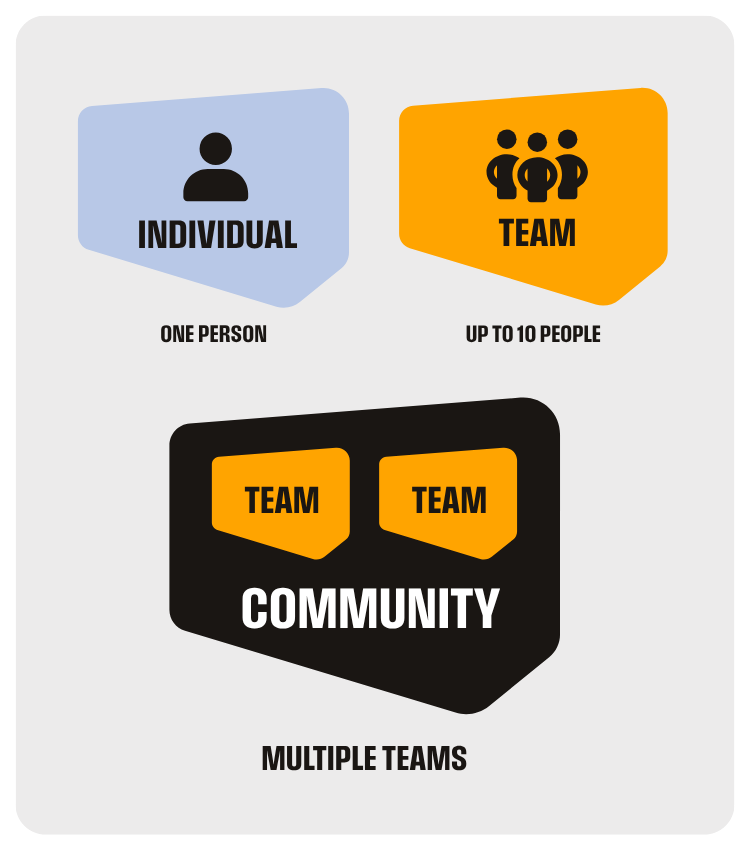
Individual
Each person registers and tracks their own push-ups.
Team
A group of individual participants taking part together. When you create a Team, you can invite people to join you and track your collective stats and individual rankings.
Community
A Community is a collection of Teams. You can even invite people to join or create their own Team within your Community. You can track collective stats, as well as see Team and individual rankings.
Got a question?
How do I create a Team?
If you've already registered, go to your dashboard and select 'Create Team'.
If you haven't registered yet, click on 'Register' and then 'Create Team or Community' and follow the prompts from there.
Is the daily/overall target individual or shared with the Team?
The app will let you know when you hit 25%, 50%, 75% and 100% of the daily targets, so you can stay on track.
How do I create a Community?
Communities are collections of Teams. To be in a Community, you need to be in a Team first.
Not in a Team? That's okay, you can create a Team of one person (you) if you like.
If you have already registered:
To create a Community go to your dashboard and select 'Create Community'. Again, if you are yet to create a Team, do that first.
If you have not already registered:
Click on 'Register' and then select 'Create Team/Community' and follow the prompts from there.
How do I join a Community?
To be in a Community, you need to be in a Team.
Communities are collections of Teams. You can create a Team of 1 person if you want to join a community but don't have a team.
If you have already registered:
To join a Community, you need to be a Team Captain. If you are a Team Captain, go to your dashboard and select 'Join Community'.
If you have not already registered:
Click on 'Register' and then select 'Create Team/Community' to create a Team, and follow the prompts from there to join a Community.